
1. Determine available device addresses. Every device that connects to the panel's keypad bus requires a unique address. By default, the AlarmNet communicator uses address 2 (as an AUI), 3 (as a communicator) and 25 (as an RIS device). If these addresses are available on the panel, it is best to use them. If any of these addresses are already in use, then you'll need to adjust radio programming accordingly.
2. Set the addresses. This step will usually be done by the alarm dealer, but it's important that their programming matches up with the device programming that has been enabled in the panel. In our example, we're going to assume address 2 was already in use on the panel. In this case, we moved our AUI emulation in the communicator to address 6 instead. Our programming examples will reflect that.
3. Enter panel programming. Enter Installer Code [default = 4140] + [8] + [000]. You should see this prompt:

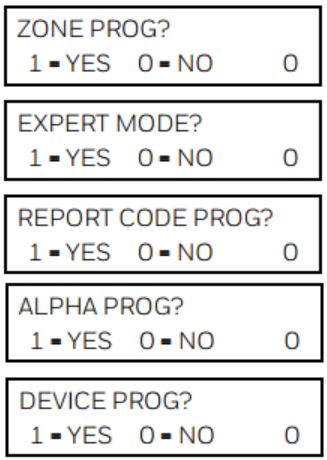
Next, enter the command [# 93]. After providing this input, you will see each of the prompts shown below. Press 0 for "No" until you get to "Device Program", which is shown in the last prompt. Then hit 1 for "Yes".
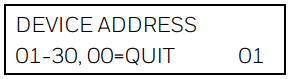
4. Enter the device address. In our example, this is Address 03. Then press *
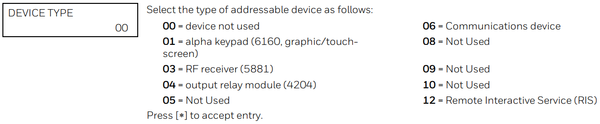
5. Enter the device type. The device type for an AlarmNet Communicator is 06. Press * to continue to the next prompt.
At the "Program Radio" prompt, press 0 for "No". This will return you to "Device Address"
At "Device Address" enter 06, for the communicator's AUI emulation programming address. Enter device type 01. This portion of programming is configured like a keypad. Program the remaining prompts as shown. Press * after the last entry to return to the "Device Address" prompt.

6. Enable RIS. Back at "Device Address" enter 25, then press *. Select "Device Type" 12, RIS, then press *. Exit Programming. At "Device Address" press 00 *, at "Quit Menu Mode?" Press 1 for "Yes". Back at "Program Mode *Fill #View - 00" enter *99 to exit programming.